Back to worksResume
Coldwell Banker — CRM, Redesigned cover
Product · Enterprise CRM2026

Coldwell Banker — CRM, Redesigned

Coldwell Banker (Real Estate CRM)

An enterprise real-estate CRM rebuilt around the sales agent — a bilingual lead-ticket workflow, a filter system that scales from one field to twenty, and a lead table that actually respects a day of triage.

Overview

Coldwell Banker's sales teams live inside a lead-tickets CRM: they add leads by phone, qualify them, assign them to agents, and chase them across weeks of activity. I redesigned the core workflow — the dashboard, the Add Lead Ticket flow, and the Manage Leads Tickets table with its filters — around three needs the old product ignored: bilingual (English + Arabic) client data captured in one form, a filter system that stays out of the way until an agent wants it, and a lead table that renders 10 rows of nine columns without becoming a wall of noise.

The problem

The legacy CRM broke down at three moments. On login, agents got a text list of pending items instead of a dashboard — no counts, no urgency, no next action. Creating a lead meant one 40-field scroll with English-only name fields, so Arabic client records ended up transliterated inconsistently and no one could search them. Managing leads meant a single filter block with 15 filters permanently open and a table with no column control, no bulk actions, and no way to save a working view. The redesign had to fix the trip to the CRM before the day even started — and the two screens every agent lives in for the rest of it.

Context

Coldwell Banker's agents don't sit at a desk — they take a lead on the phone, tag it, hand it to a teammate, and check back on it three days later while walking a property. The CRM they had was built for a data-entry clerk: one giant scrolling form, filters as a wall of 15 dropdowns, and a table that showed everything at once. Sales managers wanted a home that answered 'what needs my attention today?' in one look. Agents wanted an add-ticket flow that respected the fact that half their clients only exist in Arabic. Everyone wanted a table that stopped shouting.

Design principles

01

Dashboard as a to-do, not a report

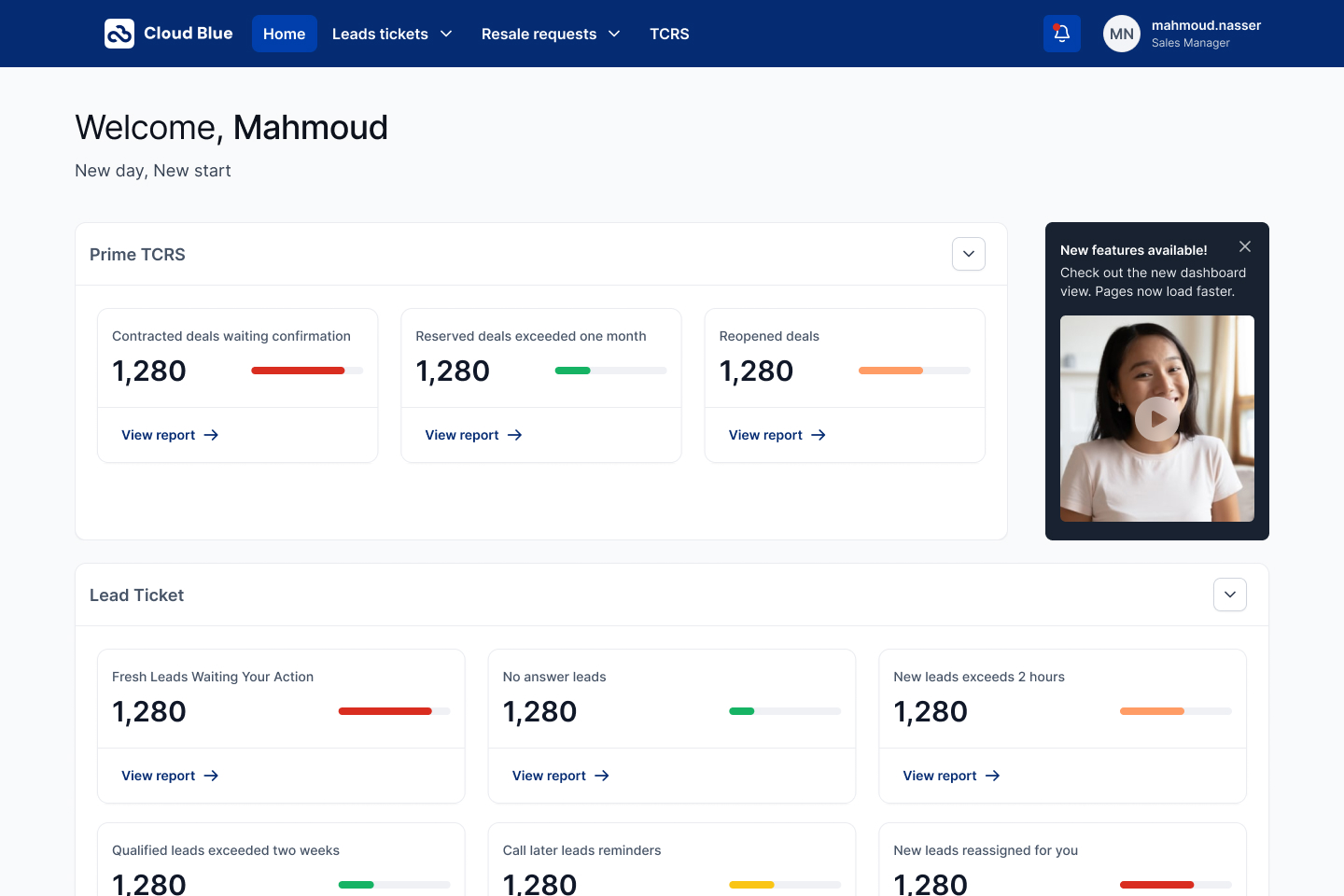
The home page groups the day's work into two blocks — Lead Tickets and Prime TCRS — each with counter cards (Fresh Leads Waiting Your Action, No answer leads, New leads exceeds 2 hours, Reopened deals) that carry a number, a health bar, and one action: View report. The agent lands and knows what's on fire.

02

Bilingual is a first-class field, not a toggle

Every client name is captured twice — English Title & Name and اسم ولقب العميل باللغة العربية — side by side, each with its own honorific dropdown (Dr., د.). Search on the Manage page then works in either language without a settings switch.

03

One form, five accordions

Add Lead Ticket is one page split into five collapsible sections — Find Client · Client Info · Request Info · Assigning · Additional Details. The agent expands only what they need. The Confirm bar stays docked at the bottom so the flow never asks 'where do I save this?'.

04

Filters collapse to their labels

The Manage page defaults to three closed filter pills — Client & Source · Basics · Activities. Each opens in place with a count badge showing how many filters are active. Nothing screams; everything is one tap away.

05

The table respects the day

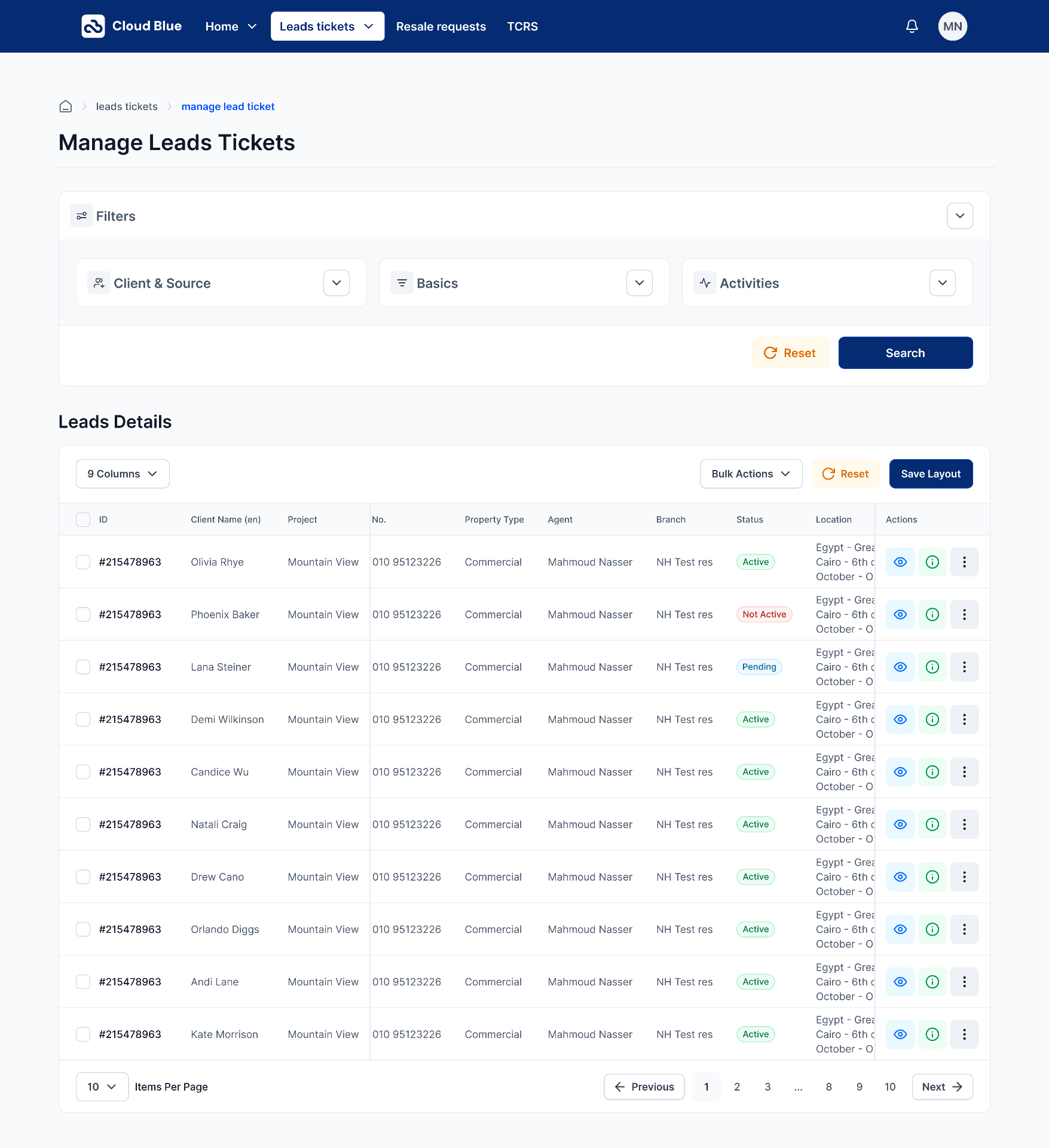
Leads Details ships a 9-column layout with a column-count control, Bulk Actions, Reset, and Save Layout up top. Status cells use small semantic pills (Active / Not Active / Pending); Actions collapse to three icons. Ten rows fit on one screen without a horizontal scroll.

Process summary

  • 01Shadowed sales agents through a full day — tracked how many taps it took to add a lead, filter to their agents, and reopen a stalled deal. Baseline was 14 taps to the same lead twice.
  • 02Mapped the three core surfaces (Home · Add Lead Ticket · Manage Leads Tickets) and defined the shared shell — deep navy top bar with Home / Leads tickets / Resale requests / TCRS, an active-tab underline, and a settings + notifications + avatar cluster on the right.
  • 03Designed the dashboard as two grouped card blocks so a manager sees their whole team's health in one screen; every card carries the same anatomy (label, big number, health bar, View report).
  • 04Rebuilt Add Lead Ticket as five accordions with a persistent Cancel / Confirm bar. Client Info split into Personal Info (bilingual name row) and Contacting Info (device rows with add / delete), then Client Source (Marketing Agency · How did you hear · Tell us more).
  • 05Expanded the Request Info block into three sub-groups — Request Type (Sales / Service / Usage / Property), Request Location (Country / City / District / Project), and Request Budget (Currency + min/max) — so the agent captures the deal shape in one section.
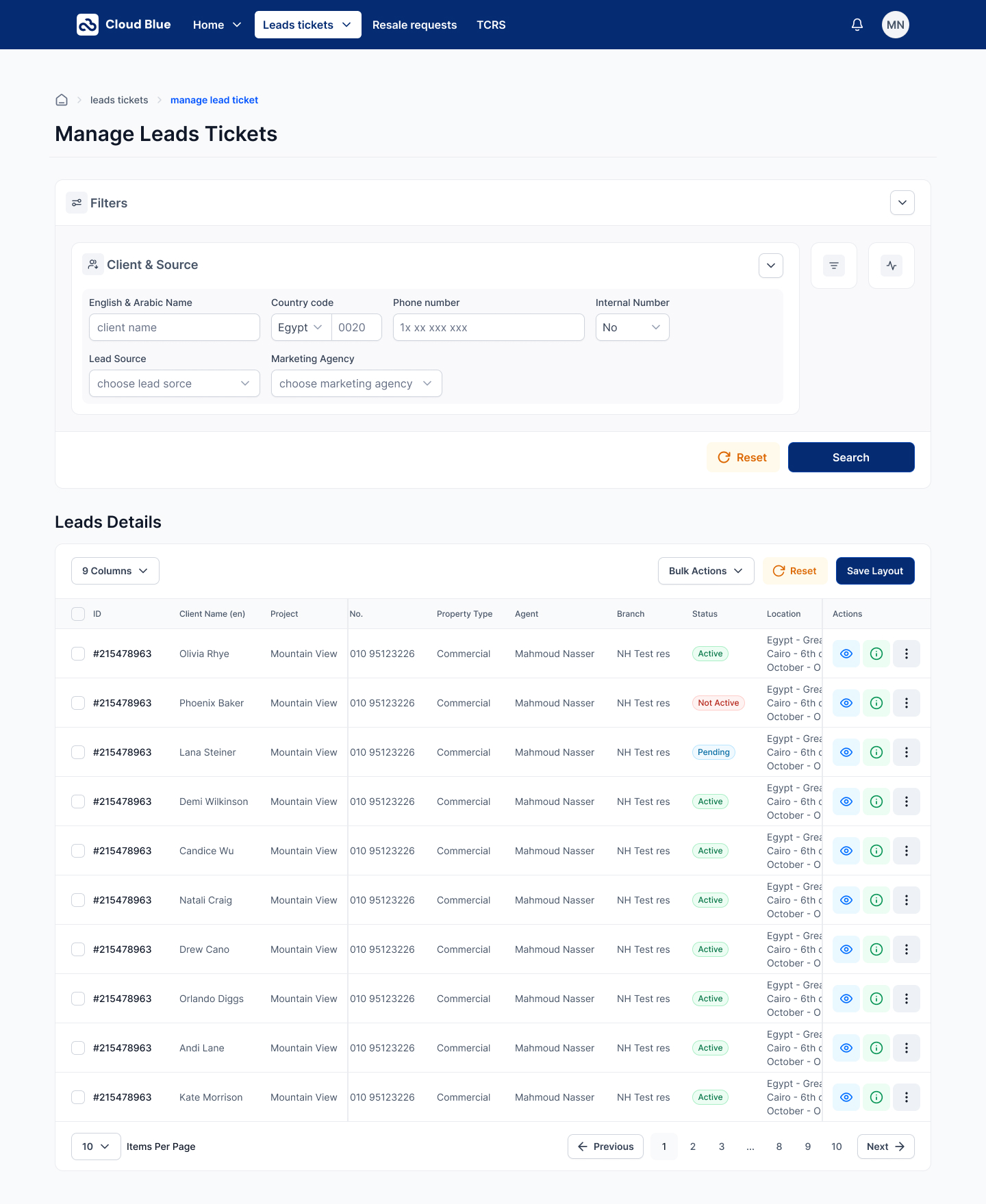
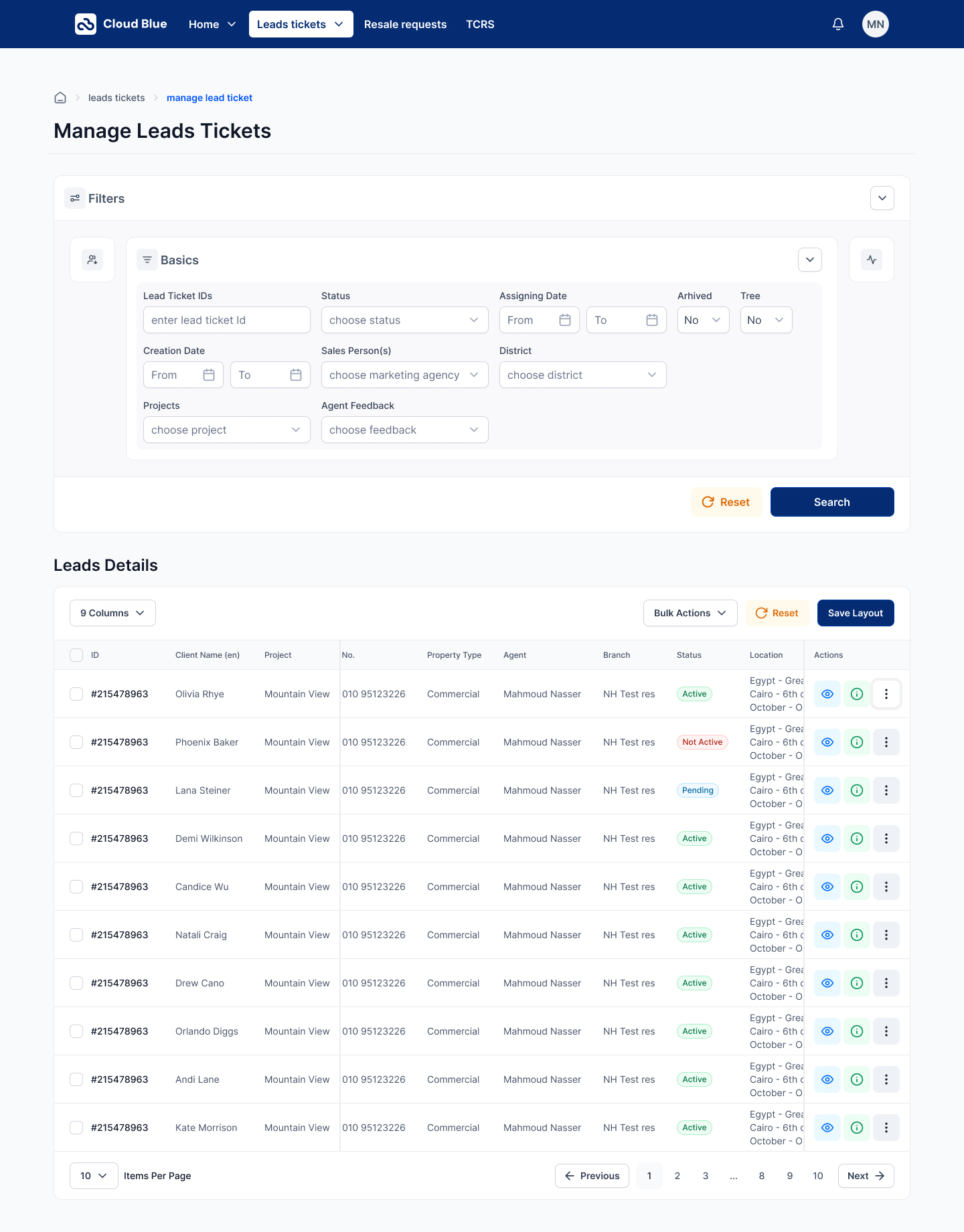
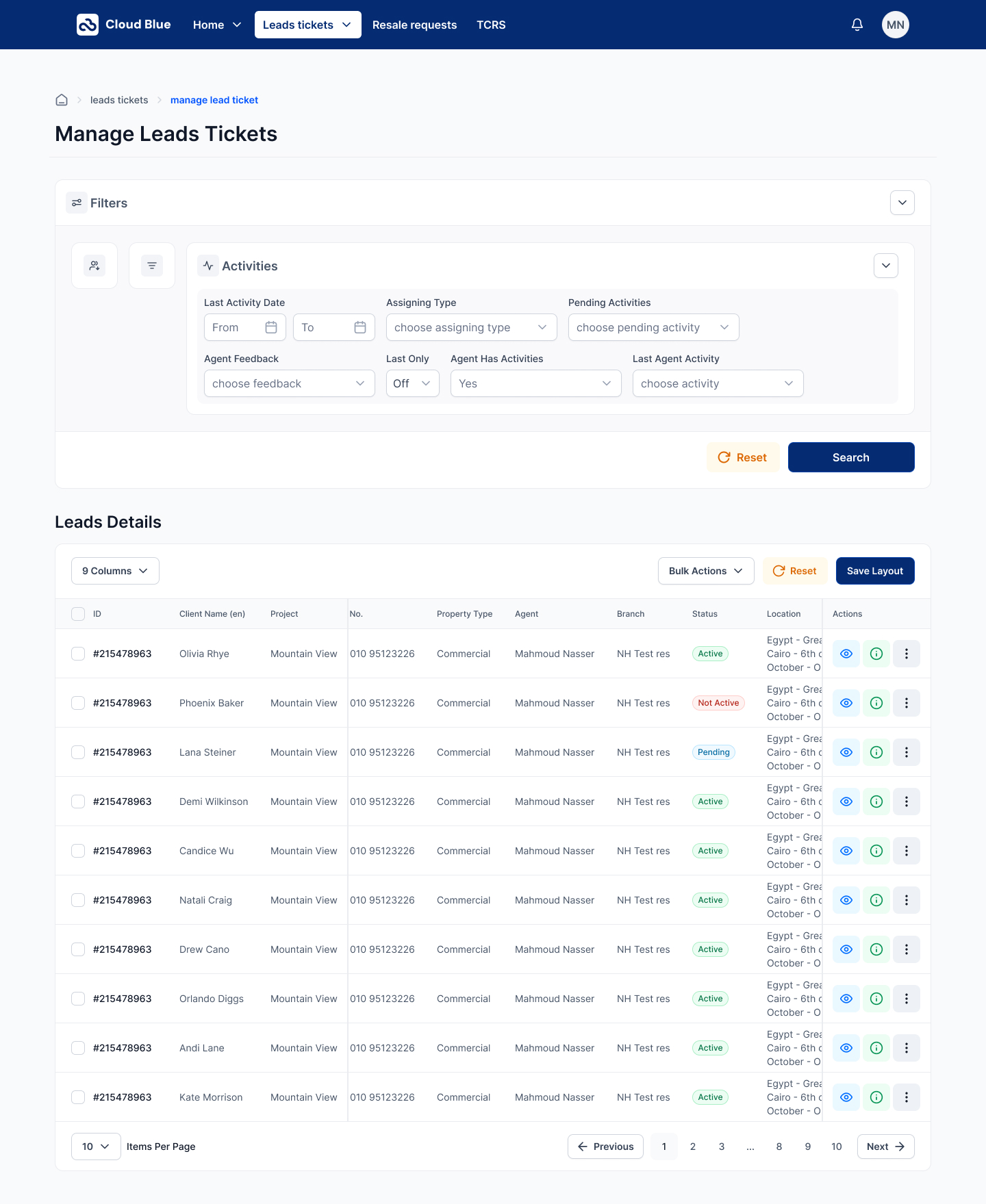
  • 06Redesigned the Manage page filters as three collapsible cards. Open state exposes Client & Source (English & Arabic Name, Country code + Phone, Internal Number, Lead Source, Marketing Agency); Basics (Ticket IDs, Status, Assigning Date, Archived / Tree, Creation Date, Salesperson, District, Projects, Agent Feedback); Activities (Last Activity Date, Assigning Type, Pending Activities, Agent Feedback, Last Only, Agent Has Activities, Last Agent Activity). Closed state shows the label + a count badge.
  • 07Shipped the Leads Details table with a 9 Columns selector, Bulk Actions menu, Reset, and Save Layout. Each row: ID (#215478963), Client Name (en), Project, No., Property Type, Agent, Branch, Status pill (Active / Not Active / Pending), Location (Egypt — Grea Cairo — 6th of October — O), and three action icons (view / info / more).
  • 08Handed off with a component sheet — Nav bar, Breadcrumb, Section card, Filter accordion, Counter card, Form field, Table row, Status pill, Action icon, Pagination — every state, size, and interaction tokenized 1:1 with the Figma library.

Screens

Home — Welcome header ('Welcome, Mahmoud / New day, New start') sits above two grouped card blocks. Prime TCRS carries Contracted deals waiting confirmation, Reserved deals exceeded one month, and Reopened deals; Lead Ticket carries Fresh Leads Waiting Your Action, No answer leads, New leads exceeds 2 hours, Qualified leads exceeded two weeks, Call later leads reminders, and New leads reassigned for you — every card with a number, a colored health bar, and a single View report link. A dismissible 'New features available' card pins to the right rail.
01Home — Welcome header ('Welcome, Mahmoud / New day, New start') sits above two grouped card blocks. Prime TCRS carries Contracted deals waiting confirmation, Reserved deals exceeded one month, and Reopened deals; Lead Ticket carries Fresh Leads Waiting Your Action, No answer leads, New leads exceeds 2 hours, Qualified leads exceeded two weeks, Call later leads reminders, and New leads reassigned for you — every card with a number, a colored health bar, and a single View report link. A dismissible 'New features available' card pins to the right rail.
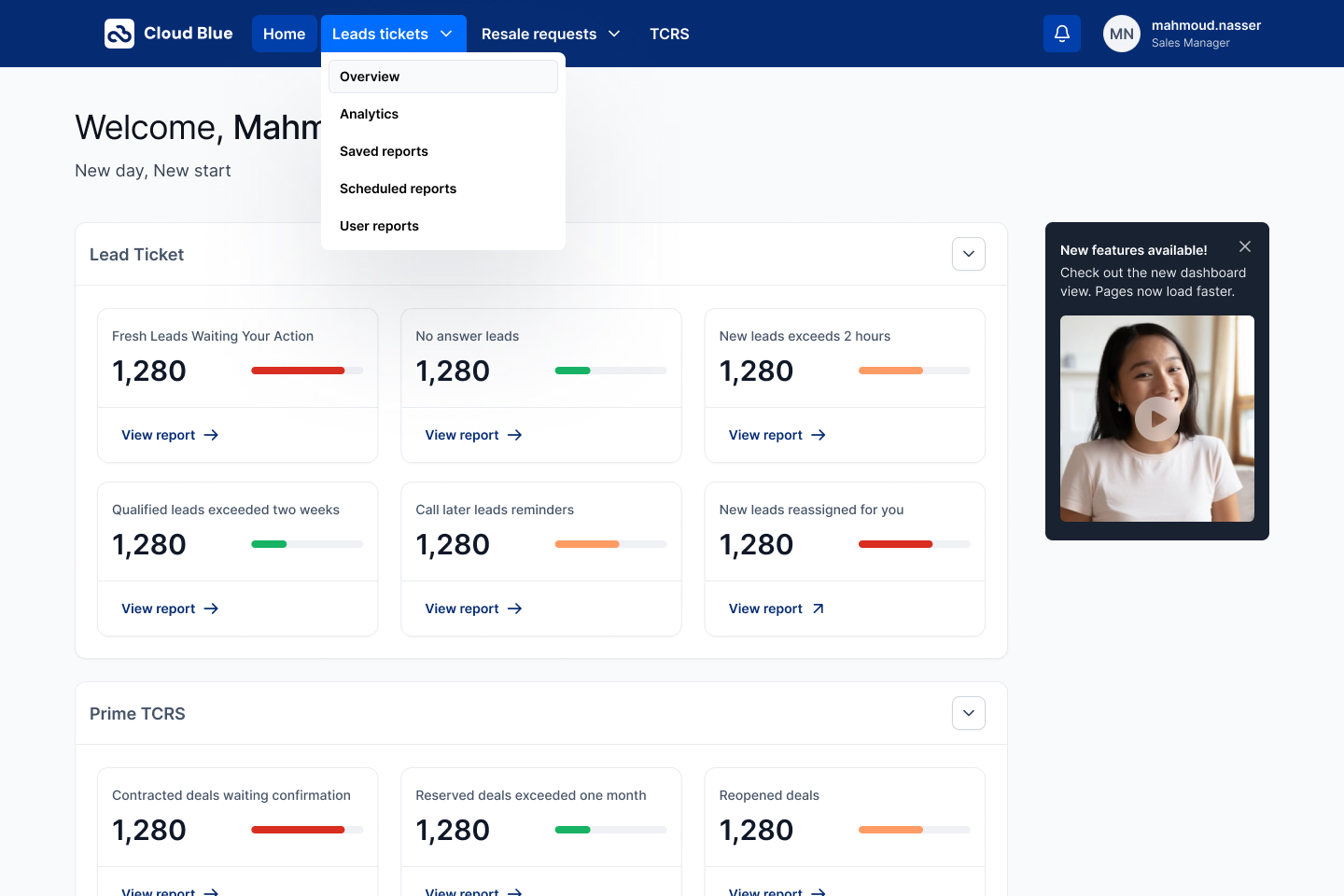
Home — Leads tickets tab open. The primary nav item drops a five-item menu (Overview · Analytics · Saved reports · Scheduled reports · User reports) so navigation between sub-pages happens in one tap without leaving the dashboard context.
02Home — Leads tickets tab open. The primary nav item drops a five-item menu (Overview · Analytics · Saved reports · Scheduled reports · User reports) so navigation between sub-pages happens in one tap without leaving the dashboard context.
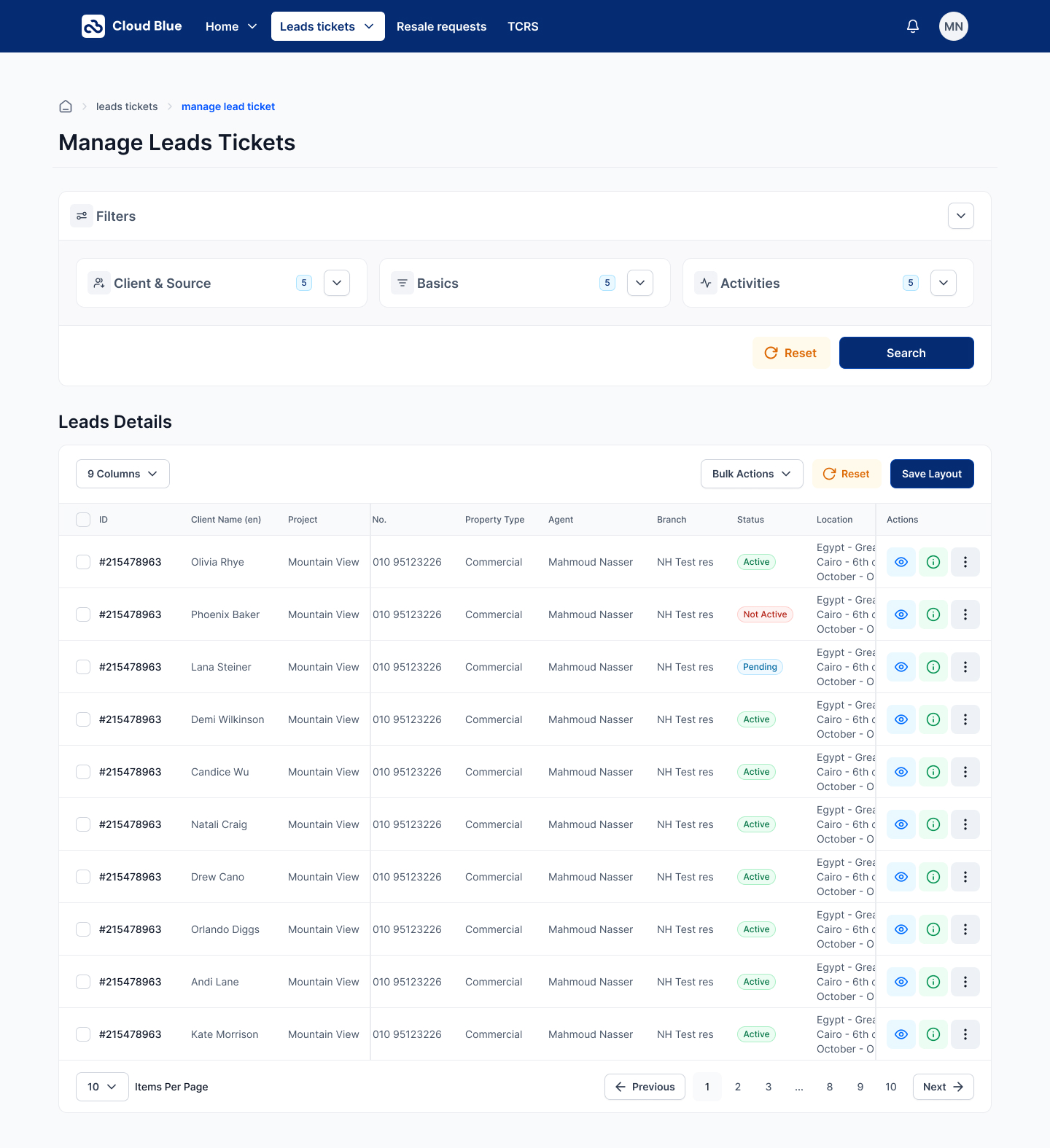
Manage Leads Tickets — closed state. The Filters card collapses to three pills (Client & Source · Basics · Activities) so the working area is the table by default. Leads Details renders nine columns (ID / Client Name (en) / Project / No. / Property Type / Agent / Branch / Status / Location) with Bulk Actions, Reset, and Save Layout in the header, and a 10-per-page pagination with numbered pages and prev/next controls.
03Manage Leads Tickets — closed state. The Filters card collapses to three pills (Client & Source · Basics · Activities) so the working area is the table by default. Leads Details renders nine columns (ID / Client Name (en) / Project / No. / Property Type / Agent / Branch / Status / Location) with Bulk Actions, Reset, and Save Layout in the header, and a 10-per-page pagination with numbered pages and prev/next controls.
Manage Leads Tickets — Client & Source filter open. Six fields in a two-row grid: English & Arabic Name, Country code (Egypt / 0020), Phone number, Internal Number toggle, Lead Source, and Marketing Agency. Reset and Search sit right-aligned. The other two groups stay collapsed to their icons on the left rail.
04Manage Leads Tickets — Client & Source filter open. Six fields in a two-row grid: English & Arabic Name, Country code (Egypt / 0020), Phone number, Internal Number toggle, Lead Source, and Marketing Agency. Reset and Search sit right-aligned. The other two groups stay collapsed to their icons on the left rail.
Manage Leads Tickets — Basics filter open. Nine fields in a three-row grid: Lead Ticket IDs, Status, Assigning Date (From / To), Archived, Tree, Creation Date (From / To), Sales Person(s), District, Projects, and Agent Feedback — every date field paired with a calendar icon so range picks stay predictable.
05Manage Leads Tickets — Basics filter open. Nine fields in a three-row grid: Lead Ticket IDs, Status, Assigning Date (From / To), Archived, Tree, Creation Date (From / To), Sales Person(s), District, Projects, and Agent Feedback — every date field paired with a calendar icon so range picks stay predictable.
Manage Leads Tickets — Activities filter open. Seven fields covering behavioural signals: Last Activity Date, Assigning Type, Pending Activities, Agent Feedback, Last Only toggle, Agent Has Activities (Yes / No), and Last Agent Activity. The three-icon rail on the left keeps switching between groups a single tap.
06Manage Leads Tickets — Activities filter open. Seven fields covering behavioural signals: Last Activity Date, Assigning Type, Pending Activities, Agent Feedback, Last Only toggle, Agent Has Activities (Yes / No), and Last Agent Activity. The three-icon rail on the left keeps switching between groups a single tap.
Manage Leads Tickets — all three filter groups collapsed with active counts. Each pill carries a small badge ('5') showing how many filters are set inside — the agent sees the shape of their query without expanding anything.
07Manage Leads Tickets — all three filter groups collapsed with active counts. Each pill carries a small badge ('5') showing how many filters are set inside — the agent sees the shape of their query without expanding anything.
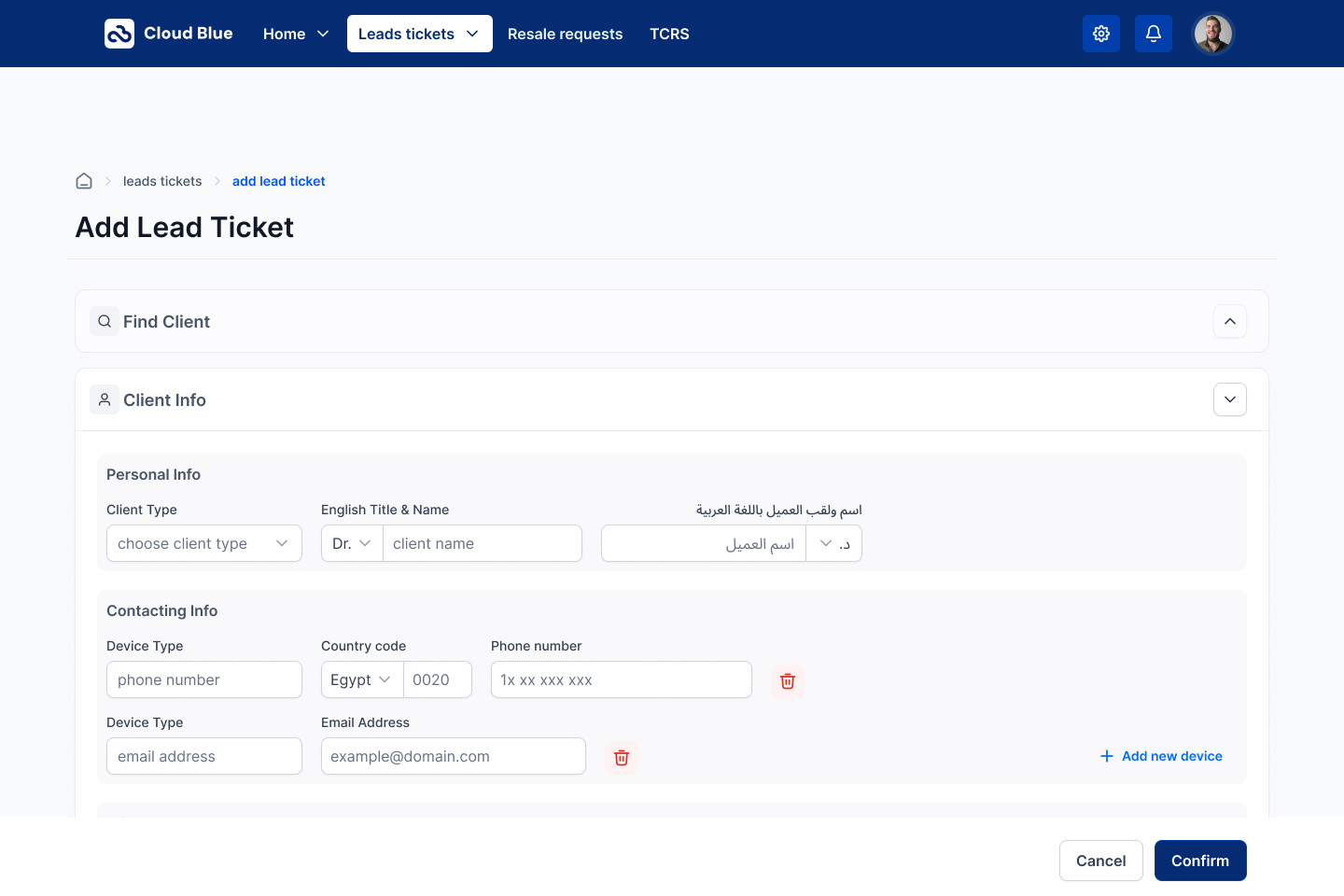
Add Lead Ticket — Client Info accordion. Personal Info captures the client bilingually: Client Type, English Title & Name (Dr. + client name), and اسم ولقب العميل باللغة العربية (د. + اسم العميل) in a mirrored RTL field. Contacting Info stacks device rows (phone number, email address) with per-row delete and an Add new device link, so a lead with three phones and two emails takes one screen.
08Add Lead Ticket — Client Info accordion. Personal Info captures the client bilingually: Client Type, English Title & Name (Dr. + client name), and اسم ولقب العميل باللغة العربية (د. + اسم العميل) in a mirrored RTL field. Contacting Info stacks device rows (phone number, email address) with per-row delete and an Add new device link, so a lead with three phones and two emails takes one screen.
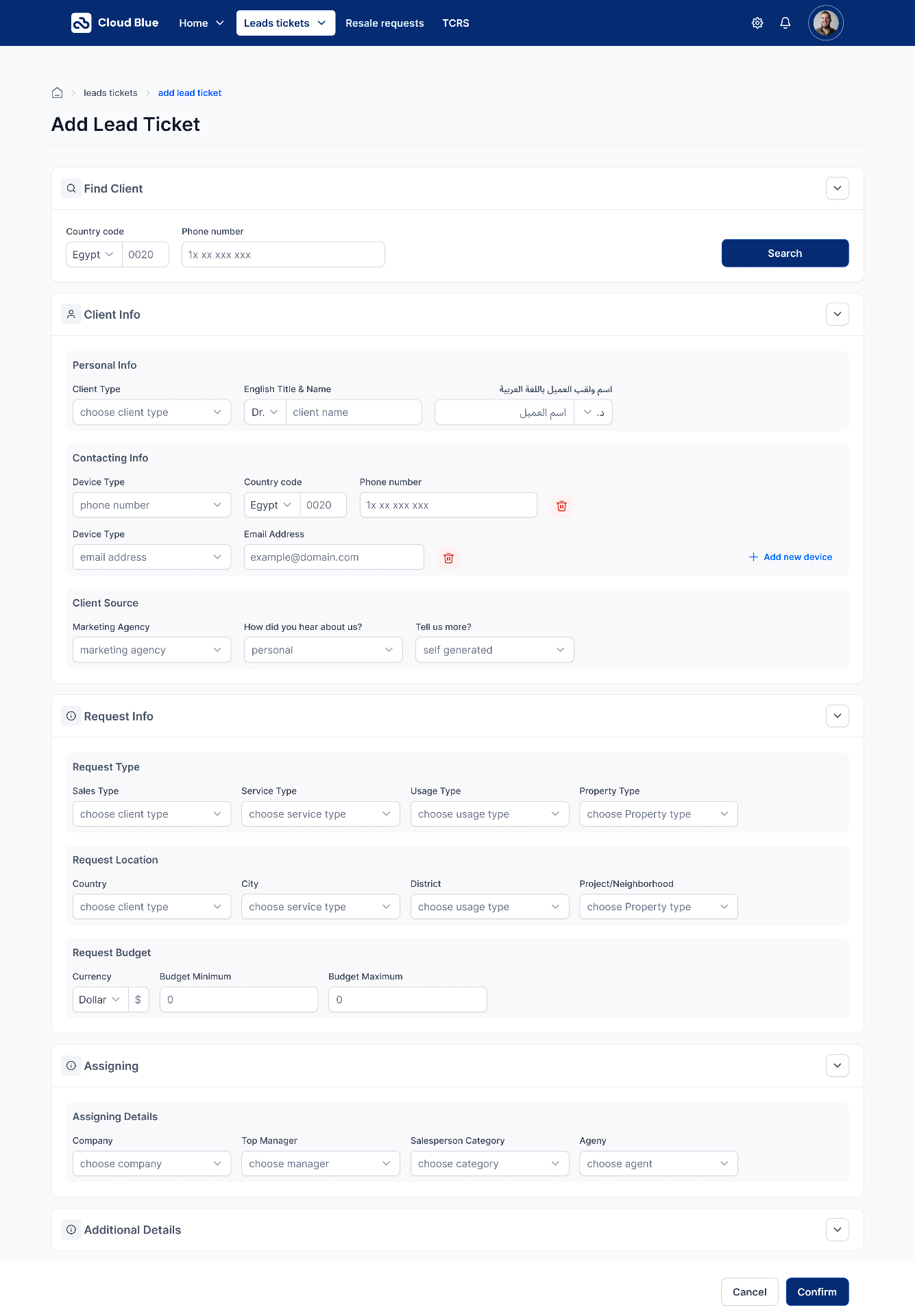
Add Lead Ticket — full flow. Five accordions open in sequence: Find Client (Country code + Phone + Search), Client Info (Personal + Contacting + Client Source), Request Info (Request Type / Location / Budget with min-max), Assigning (Company / Top Manager / Salesperson Category / Agent), and Additional Details. A persistent white footer bar carries Cancel and Confirm, so the agent never loses the save action.
09Add Lead Ticket — full flow. Five accordions open in sequence: Find Client (Country code + Phone + Search), Client Info (Personal + Contacting + Client Source), Request Info (Request Type / Location / Budget with min-max), Assigning (Company / Top Manager / Salesperson Category / Agent), and Additional Details. A persistent white footer bar carries Cancel and Confirm, so the agent never loses the save action.
Reflection

Enterprise CRMs get designed for the person who buys them, not the person who uses them for eight hours a day. The Coldwell Banker redesign inverts that: the dashboard answers the agent's first question of the day, the add-ticket flow respects the bilingual reality of a Cairo real-estate desk, and the manage page treats filters as tools an agent opens on purpose — not a wall to fight through. The result is a CRM that gets out of the way of the sale.